Updated for July 2026
How to Spot Anomalies in Spuddy's Anomaly
Spotting anomalies is the skill ceiling in Spuddy's Anomaly on Roblox. Spuddy Butter Games hides impostors among ordinary diner guests, and the game rewards methodical inspection over twitch guesses. Anomalies are not always grotesque; many mimic regulars with one or two wrong details visible only from certain angles or through secondary tools. Your workflow should be layered: a quick visual sweep at the counter, a camera pass when the queue allows, and photo capture when subtlety demands proof. Each layer catches different categories — visual tells for anatomy and outfit errors, camera anomalies for spatial impossibilities, photo anomalies for rendering glitches invisible to the naked eye. Rushing any layer increases false negatives (served impostors) and false positives (angry legitimate customers). This guide teaches repeatable habits, shift-aware baselines, and cross-verification so rejections feel justified instead of random. Late-shift impostors often mimic NPCs you served safely two shifts ago — note hair palette and apron variants in your shift tracker so familiarity does not override fresh inspection.
Build a shift baseline before judging faces
At the start of every shift, spend thirty seconds noting what 'normal' looks like tonight. Uniform variants, hair color distribution, and prop items change with progression and updates such as Void Spuds. Compare the first two genuine customers carefully — they anchor your expectations. When the third arrival shares odd details but matches shift palette, suspicion rises; when they break palette entirely, escalate immediately.
Baselines also include behavior, not just cosmetics. Real customers fidget, glance at menus, and react to kitchen sounds. Many anomalies loop animations or stare through you. Behavioral tells should never alone trigger rejection, but paired with visual oddities they strengthen the case for shutter use.
Visual tells at the counter window
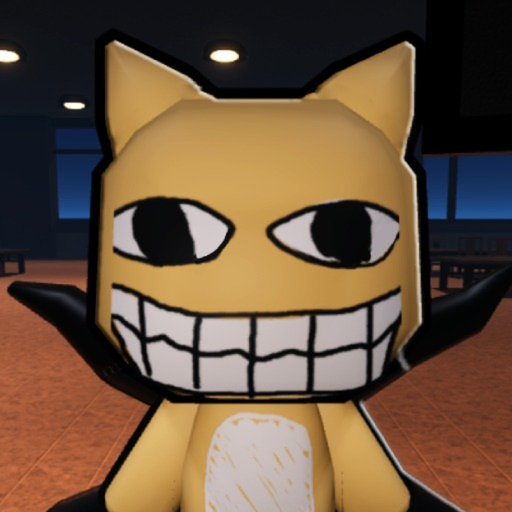
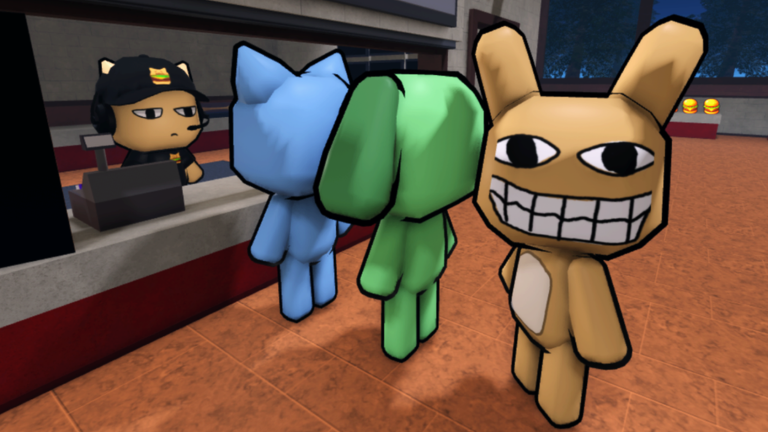
Face geometry is the highest-yield quick check: pupil size, ear placement, teeth count, and symmetry under fluorescent light. Watch for skin textures that shimmer, mouths that open too wide, or shadows that fall the wrong direction relative to overhead lamps. Outfit tells include logos that were not on the menu branding wall, shoes that clip into floor tiles, and aprons on customers who should not wear staff gear.
Scale matters. Some anomalies are subtly taller or shorter than the door frame reference marks beside the counter. Compare height against the frame sticker or booth edges when suspicion lingers. Keep our visual tells page open in a second monitor or mobile browser for category reminders during learning runs.
- Symmetry breaks on eyes, ears, or smile lines.
- Clothing from wrong era, wrong staff role, or impossible colors.
- Height or limb length inconsistent with door and booth references.
- Idle animations that loop without natural micro-movements.
Camera and photo verification
Security feeds add parallax information your eyes miss head-on. Switch cameras to catch booth backs, hallway approaches, and kitchen sightlines. Anomalies sometimes appear on monitor but vanish when you lean the same angle live — or vice versa. Note timestamp drift, static bursts, and figures standing inside locked storage areas.
Photos freeze frames for comparison. Capture empty scenes during downtime, then snap again when a customer occupies the same spot. Diff extra limbs, floating hats, or text artifacts layered over faces. Photo-only anomalies punish players who skip the snapshot tool; camera-only anomalies punish those who never look up from the grill. Alternate tools so blind spots shrink each shift.
Decision timing and rejection discipline
Reject when correlated tells exceed your personal threshold — typically two strong signals or one extreme signal. Extreme examples include impossible anatomy, duplicate customers simultaneously visible, or camera feed showing a different face than the counter guest. Borderline cases benefit from stalling via order complexity: legitimate kitchens buy seconds for another camera sweep.
After rejection, watch rating feedback and audio cues to learn whether you were correct. Mental logging beats spam retries. Pair practice with our anomaly checklist tool until inspection becomes muscle memory across all ten shifts.
Training drills between customer waves
Between waves, practice camera sweeps on empty booths even when no customer waits. Muscle memory for feed indices matters when dual queues arrive. Co-op partners can call random camera numbers while you verbally confirm what each angle should show, building speed without live rating risk.
Photo drills mean capturing two angles of the same empty booth, then comparing after a friend swaps a prop or stands in frame. Five minutes of structured drill before shift six reduces serve-anomaly mistakes more than unstructured grinding.
Void Spuds and lighting adjustments
When July 2026 Void Spuds content is active, relearn visual baselines under darker shaders — shadows hide small pupil errors that fluorescent classic diner lighting exposed. Carry a flashlight mental model: ask what each tell looks like in low contrast before rejecting on color alone.
Cross-reference our Void Spuds map page when anomalies cluster near transition zones between classic decor and void aesthetic. Mixed zones produce hybrid tells requiring both photo and camera confirmation before shutter use.
Related Pages
Frequently Asked Questions
Do all anomalies look scary immediately?
No. Many are subtle impostors designed to pass quick glances. Late shifts increase subtlety, which is why camera and photo tools matter.
Which tool catches the most anomalies?
Visual tells catch the highest volume early, but camera and photo layers catch exclusive types. Use all three for best accuracy.
Can two players compare notes in co-op?
Yes. One player on cameras while another handles the window reduces missed tells. Call out specifics — 'camera three booth warp' — not vague panic.
Where is the full anomaly list?
See our full list page for categorized entries, plus visual, camera, and photo sub-guides for focused study.
Community-verified info. Always confirm mechanics in-game after updates.